


Description
Download 1-2-3 Spyware Free – Lightweight, Secure, and Fast Spyware Removal Tool for Windows
Looking for a reliable, free, and lightweight way to clear spyware from your Windows PC? 1-2-3 Spyware Free is a no-nonsense security tool designed to detect and remove spyware with minimal system impact. Since its launch in 2005, this software has helped thousands of users—especially in Germany—keep their systems clean and secure. Though it hasn't seen updates since 2005, its simplicity and efficiency continue to make it a go-to choice for basic spyware protection. Ideal for older Windows systems like Windows 98 and XP, this tool offers a straightforward scan process with clear results. It’s perfect for users who want a quick, no-frills solution without the bloat of modern antivirus suites. Whether you're a beginner or just need a lightweight backup tool, 1-2-3 Spyware Free delivers reliable performance with minimal setup. Download it today and take control of your system’s privacy and security.
Key Features of 1-2-3 Spyware Free
Despite its age, 1-2-3 Spyware Free offers several core features that still hold value for users seeking basic spyware protection. The software is designed with simplicity in mind, making it accessible even to those with limited technical knowledge. One of its standout features is its lightweight footprint—unlike modern security tools that consume significant RAM and CPU, this app runs efficiently on older hardware, ensuring minimal slowdowns during scans.
Another major advantage is its fast scanning speed. The tool performs full system scans in a matter of minutes, identifying known spyware patterns and malicious entries in the registry and temporary files. It provides a clear, easy-to-understand report after each scan, listing detected threats and offering one-click removal options. This transparency helps users understand what’s been found and ensures confidence in the cleanup process.
Additionally, 1-2-3 Spyware Free supports multiple Windows operating systems, including Windows 98, ME, 2000, and XP—systems that are no longer supported by many modern security tools. This makes it a valuable resource for users maintaining legacy systems or older PCs that still serve essential functions. The software is entirely free, with no trial periods, subscriptions, or hidden costs, which adds to its appeal. It also doesn’t require installation—users can run it directly from a USB drive or desktop, making it portable and convenient for on-the-go use.
While it lacks real-time protection and cloud-based threat intelligence (features common in today’s antivirus software), its core function—detecting and removing known spyware—remains effective. For users who prioritize speed, simplicity, and compatibility with older systems, this tool remains a practical and secure option.
How to Install and Use 1-2-3 Spyware Free
Installing and using 1-2-3 Spyware Free is incredibly straightforward, especially for users who value minimal setup. The software is distributed as a standalone executable file, meaning there’s no traditional installation process. To get started, simply download the 123spyware.exe file from a trusted source. Once downloaded, double-click the file to launch the application—no admin rights or system permissions are required.
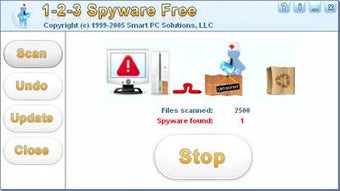
Upon opening, the program presents a clean, no-frills interface with a single main button labeled “Scan Now.” Clicking this starts an automatic system scan, which checks critical areas such as the Windows registry, temporary internet files, startup entries, and system folders for known spyware signatures. The scan runs in the background, and users can monitor progress through a simple progress bar and status updates.
After the scan completes, the tool displays a detailed report showing all detected threats. Each entry includes the name of the spyware, its location, and a brief description. Users can choose to remove individual items or select “Remove All” for a complete cleanup. The software also includes a log file feature, which saves the scan results to a text file—useful for documentation or troubleshooting.
For best results, it’s recommended to run the scan in safe mode, especially if your system is already infected. This prevents malicious processes from interfering with the scan. Additionally, users should ensure their system clock is set correctly, as some spyware may hide based on time-based triggers. While the tool hasn’t been updated since 2005, its effectiveness on legacy systems remains solid when used as part of a broader security strategy.
Compatibility and System Requirements
1-2-3 Spyware Free is specifically designed for older Windows operating systems, making it compatible with the following platforms: Windows 98, Windows ME, Windows 2000, and Windows XP. It does not support Windows Vista, 7, 8, 10, or 11, which limits its use to legacy environments. This restriction is due to the software’s outdated architecture and reliance on older system libraries that are no longer present in modern Windows versions.
Despite its age, the tool remains lightweight, requiring only a few megabytes of disk space and minimal RAM—typically less than 10 MB during operation. This makes it ideal for older computers with limited resources. It doesn’t require a permanent installation, so users can run it from a USB flash drive, external hard drive, or even a network share, which is perfect for system recovery or on-the-go cleanup.
For users with modern systems, this software isn’t recommended as a primary security tool. However, it can still serve as a supplementary utility for cleaning up old, non-bootable systems or virtual machines running legacy Windows versions. It’s particularly useful in educational settings, retro computing communities, or small businesses maintaining older hardware for specific tasks.
It’s important to note that since the software hasn’t been updated since October 2005, it does not detect newer forms of malware or zero-day threats. Therefore, it should not be used as the sole defense against modern cyber threats. Instead, it functions best as a niche tool for legacy system maintenance and basic spyware removal.
Pros and Cons of 1-2-3 Spyware Free
- Pros:
- Free and completely ad-free
- Extremely lightweight and fast
- Simple, beginner-friendly interface
- Runs on older Windows systems (98, ME, 2000, XP)
- Portable—no installation required
- Clear scan reports with one-click removal
- Cons:
- No updates since 2005—cannot detect modern malware
- Lacks real-time protection
- Not compatible with Windows Vista and later
- No cloud-based threat intelligence
- Outdated signature database
- Not suitable for primary security protection
Frequently Asked Questions (FAQ)
Is 1-2-3 Spyware Free safe to download?
Yes, 1-2-3 Spyware Free is safe to download from trusted software repositories. However, always verify the source to avoid fake or modified versions. The original file is small (under 2 MB) and contains no known malware.
Can I use 1-2-3 Spyware Free on Windows 10 or 11?
No, the software is not compatible with Windows 10 or 11. It only supports Windows 98 through XP. Running it on newer systems may result in crashes or errors due to missing legacy components.
Does 1-2-3 Spyware Free offer real-time protection?
No, it does not provide real-time scanning or protection. It only performs on-demand scans. For ongoing security, use it alongside a modern antivirus solution.
How often should I run a scan?
Run a scan when you suspect spyware, notice unusual behavior, or after installing new software. For preventive maintenance, once a month is sufficient—especially on older systems.
Can I run 1-2-3 Spyware Free from a USB drive?
Yes! The portable nature of the tool allows you to run it directly from a USB flash drive without installing it. This is ideal for cleaning infected systems or using on shared computers.
Conclusion: A Niche Tool with Lasting Value
While 1-2-3 Spyware Free may not be suitable for modern computing environments, it remains a valuable tool for users maintaining older Windows systems. Its lightweight design, ease of use, and free availability make it a solid choice for basic spyware removal on legacy hardware. For those in Germany or other regions with a strong base of older PCs, it continues to be a trusted solution.
However, it’s crucial to understand its limitations. Without updates since 2005, it cannot detect today’s sophisticated malware. Use it as a supplementary tool, not a primary defense. For current systems, pair it with modern antivirus software for comprehensive protection.
Download 1-2-3 Spyware Free today if you’re working with Windows 98, ME, 2000, or XP and need a fast, secure, and free way to clear spyware. It’s a simple tool with enduring value in the right context.
Guides & Tutorials for 1 2 3 Spyware Free
How to install 1 2 3 Spyware Free
- Click the Preview / Download button above.
- Once redirected, accept the terms and click Install.
- Wait for the 1 2 3 Spyware Free download to finish on your device.
How to use 1 2 3 Spyware Free
This software is primarily used for its core features described above. Open the app after installation to explore its capabilities.
User Reviews for 1 2 3 Spyware Free 0
No reviews found





